Imagine, you're owning a community having thousands of members and one day it comes to your notice that your profile has been deleted for whatever reason. What will you do? You Lost Your Community and Have to start all over again. But you still have an outside chance to gain access of your lost community even after your profile has been deleted...
» Instructions
Create a backup profile and make it the moderator of your already owned community.In case you don't have any moderator slots vacant, just make the profile join the community. Make sure you do that as soon as possible because this hack requires the backup profile to be the member of the community for 4-7 days.

» Notes
There is a loop hole in this method. Anyone can become the owner of the community by this method if the member is the community member for 4-7 days.
Gain Access of Your Lost Community If Your Profile Gets Deleted


Orkut Tool Kit - Softwares for Orkut

Today we are sharing an Orkut Software Toolkit which has various softwares which have never been made public before. You can have a look at the screenshot to have an idea. There are 17 softwares in this toolkit. Let us explain the features of various softwares in this tool pack.
» Orkut Tool Kit - Contents
This is a basic overview of all the softwares which are included in this tool pack. Each software will open in a new window and instruction on how to operate them will be stated there only.
Elite Fake Maker - Elite Fake Maker will allow you to make fakes so that you can use them to join and increase count of your orkut community, flood polls with votes, etc. These are deleted by orkut.
Verified Fake Maker - Verified Fake Maker allows you to create verified fakes which are not deleted by orkut. You can use them for same purpose - increase count of your orkut community, flood polls with votes, etc.
Fastest Pro Maker - Another profile maker.
Universal Voter - Flood polls using your multiple profiles which you created using above softwares.
All Option Voter - Will allow you to vote for all the options in the poll
Comment Giver - You can give comments in polls using this software. Supports as many fakes as you want to.
Topic Poll Spam Reporter - Reports polls as spam.Not of much use and worth. Orkut ain't blind.
Scrap Book Flooder - Our very loved scrap book flooder. With option to overcome flooding limit supporting unlimited profiles.
Topic Flooder - As the name suggests, this software will allow you to flood topics in a community. Not of much use. You'll be kicked out of the community.
Mass Add - Mass Add Friends allows you to send mass friend requests.
Friend Acceptor - Accepts all pending friend requests
Friend Rejector - Rejects all pending friend requests.
Community Joiner - Increase members count of your community. Make all your profiles join your communities.
DP Uploader - Upload same Display Pic in all your profiles easily.
Profile Editor - Mass edit profiles easily.
Mass Deleter - Delete all your scraps easily or community topics in seconds.
Password Changer - Mass change password of all your profiles easily
» Download - Orkut Tool Kit
Tag- that's me! 4 orkut
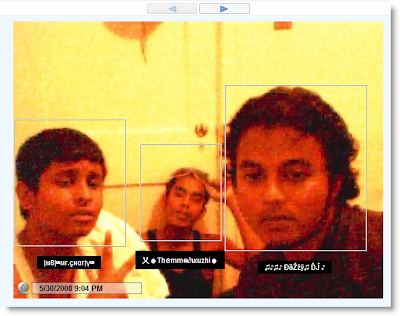
Photos have long been a popular feature of orkut, which is why we have engineers working full-time to make it easier for you to upload, share and browse photos on orkut. Recently, we increased our photo capacity so you can upload as many as you like, and we made it easier for you to organize your photos once you have them in your orkut albums. This week, we launched photo tagging so that you can label your orkut friends in your photos.
Here's how it works: when you're browsing your own or your friends' photo albums, simply click the "add tag" link below the bottom right corner of the photo. Then click your mouse over the friend you would like to label. A box will appear, prompting you to type your friend's name. As you type, the field will auto-complete so you can easily find the orkut friend you'd like to tag. When you browse tagged photos, hover over the name of a person to see which person he or she is in the photo. If you click, you'll be taken to his or her profile.
When one of your friends tags you in a photo, you'll receive an email. If you'd like to turn this notification off, you can go to notification settings. If a friend tags you in a photo and it's not you (or just a bad photo of you!), you can click on the trash can next to your name and delete the tag for good. The photo owner also has permission to delete any tags on his or her photos. If you'd rather not let your friends tag your photos, or be tagged in any photos, you can disable the feature completely in your privacy settings. Many people have already begun tagging their photos. Happy tagging!
Orkut Status Message Randomizer - New Status Message Every Minute

This fantastic application will allow orkut members to randomly switch their status messages. Orkut members can add as many messages as they want to along with the interval they wish the status message to change and this application will change your status messages randomly.
src="http://pagead2.googlesyndication.com/pagead/show_ads.js">
» Orkut Status Message Randomizer


Add Tags To Your Photos on Orkut

This very cool new orkut feature will allow you to add tags to your photos. Friends can tag each other friends in group photos. Each profile has a new 'photos of me' section which will inform them if any of their friends have tagged them.
» How to add tags to your orkut photos
» I don't want my friends to tag me
- In this case, navigate to your privacy settings page

- In the first section, you'll find photo tagging setting.
- Un-check the box and update your profile.
- That's all.


 Posts